Create a professional architecture or interior design website easily and for free using WordPress and the free Sima Architecture theme. You can build a modern architecture portfolio website in just a few steps—without coding.
In this article, we’ll show you how to create an architecture website using the free Sima theme.”
Watch the complete step-by-step video tutorial below to learn how to build a professional architecture or interior design website using the free Sima Architecture theme.
In this tutorial, you’ll learn how to:
First, you need a hosting and domain.
Then install WordPress from your hosting panel (most providers offer 1-click install).
Go to:
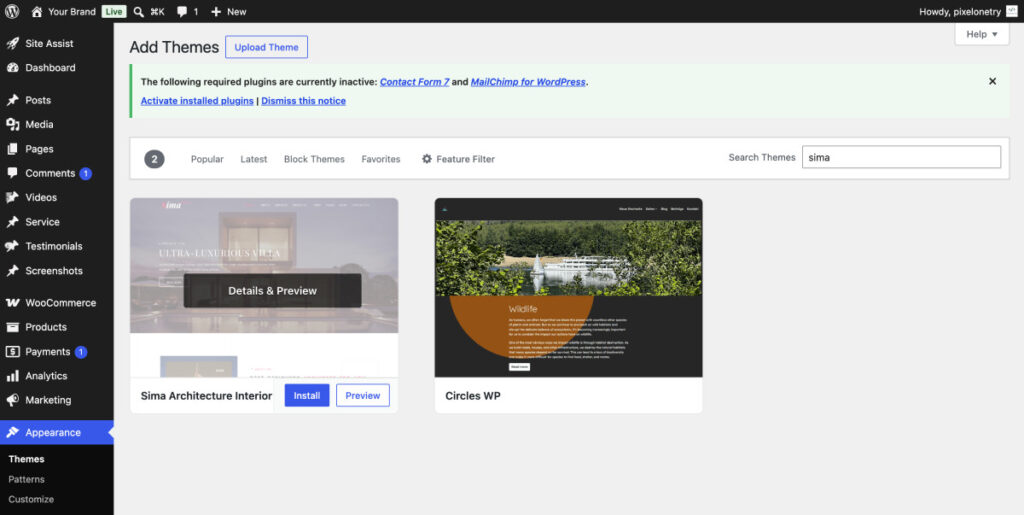
Appearance → Themes → Add New
Search for your theme (example: Sima Architecture Interior or your own theme).
Click Install → Activate
Most modern themes include demo import.
This will give you:
👉 This is the fastest way to build a real website.
Now go to Appearance → Customize
You can change:
Keep design clean and minimal — architecture websites should look modern and professional
If you need more advanced features, premium layouts, and extra customization options, you can upgrade to the Pro version of the theme.
👉 Pro version includes:

We're are pixelonetry creative studio! we make great digital assets for professionals...